 One Dev Shop
Comparison
Pitlane vs SweetPad
Both build and run without the Xcode window. SweetPad works one project at a time in a terminal. Pitlane keeps every project in one Mac window.
 Our appPitlane is the one we make. Pick it if you want one window for all your projects, and simulators that take a fraction of the memory.

 Apps of the Day
Apple Best New Apps
Product Hunt #1
by the same developer
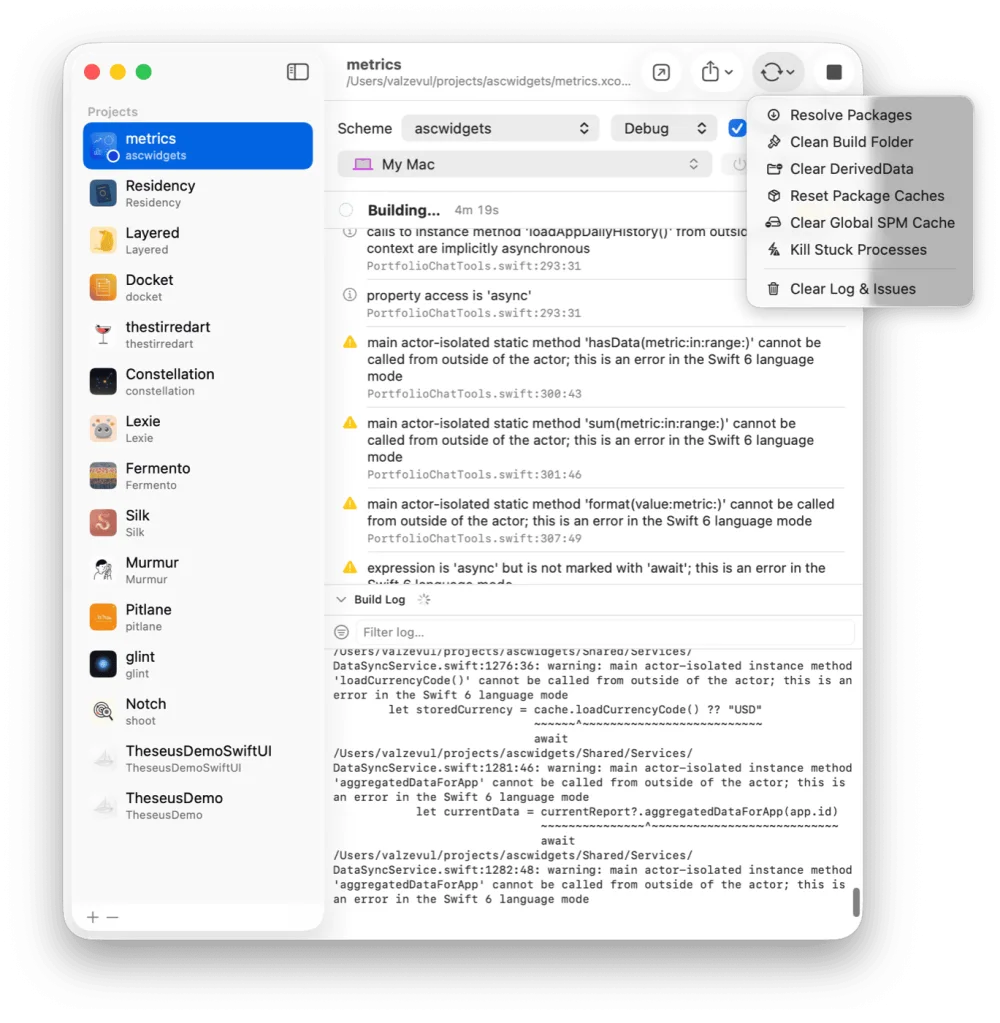
Pitlane on the Mac


Facts checked on 11 November 2026.
The short answer
Pitlane keeps every project in one window with its own scheme and destination, parses errors into a list you can click, and cuts simulator memory. SweetPad is a CLI and VS Code extension that builds, runs and tests from the terminal.
Pick Pitlane if
- You have several apps and want each to keep its own scheme and destination in one list.
- You want build errors as a list you click to open the line.
- You want three or four simulators running where one fits today.
Side by side
| Pitlane | SweetPad | |
|---|---|---|
| Built for | indie developers with several iOS apps on the go | developers who work in a terminal, VS Code or another editor and want Xcode's build tools there |
| Where it runs | on macOS 14 or later, driving the Xcode you already have | on macOS, as a CLI installed with Homebrew and a VS Code extension |
| What it does | build, run, archive and reset for every project from one window, with errors parsed into a list | build, run, test and hot reload from one command, with shorter build output |
| Simulators | boots, installs and launches on any simulator or cabled iPhone, and cuts each simulator to a half or a quarter of its memory | runs on a simulator by name, a connected iPhone or your Mac |
| For AI agents | a local HTTP API, loopback only: build, run, stop and read the parsed errors | skill files that teach a coding agent to drive its CLI |
| How you pay | a one-time purchase that covers two Macs, after a 14-day trial | free and open source under the MIT licence |
What Pitlane is
Pitlane is a Mac app that builds, runs and archives your iOS projects from one window while Xcode stays closed. It parses build errors into a list, cuts the memory each simulator takes, and serves a local API so a coding agent can do the same.
What SweetPad is
SweetPad is an open source CLI and VS Code extension that builds, runs and tests Xcode apps without opening Xcode. One command builds the app, launches it on a simulator or a device and streams the logs into the terminal, with hot reload and shorter build output.
Questions
Is Pitlane a good alternative to SweetPad?
Yes, if you want one window for all your projects, and simulators that take a fraction of the memory. Pitlane keeps every project in one window with its own scheme and destination, parses errors into a list you can click, and cuts simulator memory. SweetPad is a CLI and VS Code extension that builds, runs and tests from the terminal.
What is the difference between Pitlane and SweetPad?
Pitlane is built for indie developers with several iOS apps on the go. SweetPad is built for developers who work in a terminal, VS Code or another editor and want Xcode's build tools there.
How is Pitlane sold compared with SweetPad?
Pitlane: a one-time purchase that covers two Macs, after a 14-day trial. SweetPad: free and open source under the MIT licence.
More comparisons
- SweetPad alternatives
- Pitlane vs Xcode
- Pitlane vs XcodeBuildMCP
- Pitlane vs RocketSim
- Pitlane vs DevCleaner
- Best iOS build tools for AI agents
- All comparisons
We make Pitlane. What we say about SweetPad comes from its own pages, read on 11 November 2026: SweetPad's own site. Spotted a mistake? Write to support@onedevshop.com. SweetPad belongs to its owner, and Pitlane is not affiliated with it.
Pitlane
Every iOS project in one window
$29 once. One license covers two Macs.